EV Charging Mobile UI Kit: A Practical Resource for App Development
Building a mobile application from scratch demands time, design expertise, and a clear understanding of user expectations. In the electric vehicle space, where apps manage charging station locations, session tracking, payment flows, and real-time status updates, the interface must feel intuitive and reliable. The EV Charging Mobile UI KIT offers a structured starting point for developers, designers, and product teams who want to move from concept to prototype without reinventing common screen patterns.
What Makes the EV Charging Mobile UI KIT Worth Attention
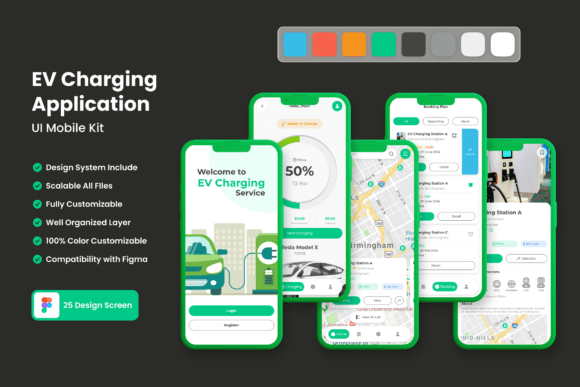
This UI kit delivers 25 pixel-perfect screen designs built specifically for electric vehicle charging applications. The scope covers the essential interactions a driver or fleet manager would expect: finding nearby stations, viewing charger availability, initiating a session, monitoring charging progress, processing payment, and reviewing history. Each screen is constructed with attention to spacing, typography, and touch-friendly controls.
Beyond the screen count, the kit includes 80 UI elements and 100 vector layers. That means buttons, input fields, progress indicators, map pins, status badges, charging animations, navigation bars, and modal dialogs are all pre-built and ready to place. The kit is available exclusively for Figma, which remains one of the most collaborative design tools for teams working across different roles.
Pixel-Perfect Precision
Every screen in the kit respects consistent spacing and alignment. In practice, this reduces the time spent tweaking margins or fixing inconsistent padding across different views. When you start with pixel-perfect layouts, the handoff to development becomes cleaner because the design specifications are already precise.
Scalability and Customizability
The 100 scalable vector layers allow you to resize any element without losing sharpness. Whether you are adapting the kit for a compact phone screen or a tablet-optimized layout, the vector assets remain crisp. The kit uses symbol objects and fully layered files, meaning you can edit individual components without breaking the structure of the whole screen.
Free Font and Icon Set
Including a free font and free icon vector set removes the licensing friction that often slows down early-stage projects. You can start prototyping immediately without purchasing additional typefaces or icon packs. The icons cover common actions like search, navigation, settings, payment, and vehicle-related symbols, which reduces the need to create custom graphics from scratch.
Easy Color Style Changes
Figma’s style features let you adjust the color palette globally. If your brand uses a specific green, blue, or dark theme, you can update the color styles in one place and see the changes propagate across all 25 screens. This flexibility makes the kit suitable for both startups and established companies that want to maintain brand consistency.
Evaluating Real-World Usability
When I work with UI kits, I look for how much they accelerate the design process without introducing unnecessary constraints. The EV Charging Mobile UI KIT strikes a reasonable balance. The screens cover the primary user journey: locating a charger, starting a charge, monitoring the session, and completing payment. This flow covers roughly 80 percent of what a production app would need at launch.
One practical example: the charging progress screen includes a clear visual indicator of current charge level, estimated time remaining, and cost accrued. These are the exact data points a driver needs at a glance. The layout avoids clutter and prioritizes the most important metric—how much charge has been added—while keeping secondary information accessible but not distracting.
The payment flow screens include input fields for card details, a summary of the charging session, and a confirmation step. For a real-world scenario, this structure reduces the number of design iterations needed to get a functional prototype in front of test users. You can validate the flow early and adjust based on feedback rather than spending weeks building every screen from zero.
Limitations to Consider
No kit is a complete replacement for custom design work. The 25 screens cover the core flow, but they do not include every possible edge case: error states, offline mode, multiple payment methods beyond basic card entry, or multi-language support. You will need to design these additional states yourself. However, the kit provides a solid foundation that reduces the initial workload significantly.
Also, the images used in the preview screens are for demonstration only and are not included in the download. You will need to source or create your own imagery for charger photos, maps, or vehicle illustrations. This is standard practice for UI kits, but it is worth noting so there are no surprises when you open the file.
Freelance Designers and Small Agencies
If you are a freelancer tasked with building an EV charging app for a client, this kit gives you a head start. You can present polished screens during the pitching phase and then iterate quickly once the project is approved. The editable Figma layers allow you to adapt the design to the client’s brand without rebuilding elements from scratch.
Startup Founders and Product Managers
For early-stage EV charging startups, speed matters. You need a prototype to demonstrate to investors, partners, or early adopters. With this kit, you can assemble a clickable prototype in days rather than weeks. The consistent design language also helps you communicate your product vision clearly before hiring a full-time design team.
Design Teams in Established Companies
Teams working within larger organizations can use this kit as a reference or as a starting point for internal projects. The symbol objects and layered structure make it easy to share design assets across team members. If your company operates in the EV ecosystem—fleet management, charging network operations, or utility partnerships—this kit can serve as a common visual language for internal tools as well.
Educators and Students
In academic settings, this kit provides a realistic case study for teaching mobile UI design. Students can analyze the screen patterns, learn how to structure a charging app flow, and practice customizing components. The free font and icon set reduce barriers for students who may not have access to expensive design resources.
Practical Recommendations for Getting the Most Out of the Kit
- Start with the user flow. Map out the key journeys—finding a charger, starting a session, paying—and identify which screens from the kit map to each step. This helps you see coverage gaps early.
- Customize the color styles first. Before editing individual screens, set your brand colors and typography in Figma’s style panel. This global change keeps the design consistent from the beginning.
- Extend the kit with your own components. Use the existing elements as a base for additional screens like onboarding, account settings, or support chat. Maintaining the same grid and spacing ensures visual harmony.
- Test with real content. Replace placeholder text with actual station names, pricing, and location data. This reveals layout issues that abstract text might hide, such as long address strings or variable pricing formats.
- Validate the payment flow with users. The existing screens provide a solid starting point, but payment UX often requires extra attention to security cues and error handling. Plan to design those states explicitly.
Long-Term Value and Durability
UI kits can lose relevance quickly if they rely on design trends that date themselves. The EV Charging Mobile UI KIT uses a clean, functional aesthetic that avoids excessive ornamentation. The layouts prioritize readability and clear calls to action, which aligns with current mobile design best practices. Since the kit is built with vector layers and symbol objects, you can update the visual style gradually as design trends evolve rather than replacing the entire file.
The decision to build the kit exclusively for Figma is practical for most teams. Figma has become a standard tool for UI design collaboration, and its component and style features make kits like this genuinely editable rather than just decorative. You can reuse the components across multiple projects, which extends the kit’s value beyond a single app.
Is the EV Charging Mobile UI KIT Right for Your Project
If your goal is to build a functional, well-designed EV charging mobile app without spending months on screen-level design, this kit is a strong candidate. It covers the essential screens and provides enough flexibility to adapt to your specific use case. The pixel-perfect layouts and scalable vectors reduce the gap between design and development handoff.
On the other hand, if your project demands highly specialized interactions—such as custom hardware integration, real-time charger diagnostics, or complex fleet management dashboards—you will likely need to supplement the kit with additional screens and components. View the kit as a foundation that accelerates the early stages of design work, not as a complete production-ready product.
For designers and teams already comfortable with Figma, the learning curve is negligible. You can open the file, inspect the layers, and start editing immediately. For those new to Figma, the organized file structure and symbol objects also serve as a learning tool for understanding how professional UI kits are built.
Final Observations
The EV Charging Mobile UI KIT addresses a specific and growing need in the mobile app space. As electric vehicle adoption increases, the demand for well-designed charging applications will follow. Having a set of 25 pixel-perfect screens that cover the primary user journey gives teams a practical advantage in moving from idea to prototype.
The inclusion of 80 UI elements, 100 vector layers, free font, and free icons adds tangible value without inflating the complexity. The fully layered file structure and easy color style changes mean the kit respects the designer’s need for control rather than forcing a rigid template. While you will need to handle edge cases and custom imagery separately, the core flow is solid enough to support both rapid prototyping and iterative refinement.
For anyone building a mobile app in the EV charging domain—whether you are a solo designer, a startup team, or an internal product group—this UI kit offers a practical, well-structured foundation that can save weeks of initial design work and help you focus on the features that differentiate your product.