Education Application Mobile UI KIT: Build Better Learning Apps Faster
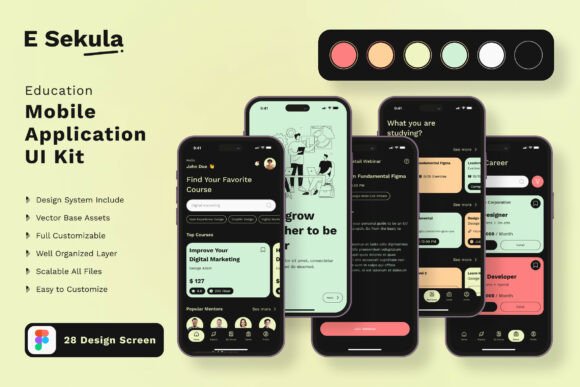
Building a mobile application for education is a rewarding but demanding endeavor. Whether you are creating a platform for language learning, exam preparation, skill development, or classroom management, the user interface plays a decisive role in how learners engage with your content. A confusing or cluttered interface can frustrate users and undermine even the most valuable educational material. This is where the Education Application Mobile UI KIT becomes an essential resource. It provides a ready-made foundation of 28 high-quality templates that allow you to focus on your educational content rather than starting from scratch with every screen.
The Real Challenge of Educational App Development
Designing a mobile application for education involves more than just arranging buttons and text fields. You need to create an environment that supports focus, reduces cognitive load, and makes navigation feel intuitive for learners of all ages. Many developers and educators underestimate how much time is required to design screens that balance visual appeal with functional clarity.
Consider the typical needs of an educational app. Users need to log in, browse courses, track progress, complete quizzes, access materials, and communicate with instructors. Each of these tasks requires a distinct screen layout. Without a well-thought-out UI kit, you end up designing each screen individually, testing interactions, and adjusting layouts repeatedly. This process drains time and resources that could be better spent refining your educational content and teaching methodology.
Another common challenge is consistency. When different screens are built in isolation, small design inconsistencies creep in. Button styles shift, spacing changes, and fonts vary. For learners, these inconsistencies can be subtly distracting, reducing trust in the application and making the experience feel unpolished. The Education Application Mobile UI KIT addresses these issues directly by offering a cohesive set of screens that work together harmoniously.
How This UI Kit Simplifies Your Workflow
The Education Application Mobile UI KIT is not just a collection of pretty screens. It is a practical toolkit designed to accelerate your development process while maintaining high design standards. With 28 pixel perfect screen designs, you have a solid starting point for nearly every common function within an educational app. From onboarding and course selection to quiz interfaces and progress dashboards, the templates cover the essential touchpoints of the learning journey.
Because the kit is fully editable in Figma, you can customize each screen to match your brand, adjust layouts to suit your specific content, and add or remove elements as needed. This flexibility is crucial because no two educational apps are exactly alike. A language learning app may require more interactive elements, while a professional certification platform might prioritize clean reading layouts. The kit adapts to your needs.
One of the most practical benefits is the inclusion of 80 UI elements and 100 vector layers. These components are ready to use and can be combined in countless ways. You are not limited to the screens as they appear in the preview. Instead, you can mix and match elements to create entirely new layouts. This modular approach saves hours of design work and allows you to iterate quickly based on user feedback.
Practical Applications Across Different Educational Contexts
Different users will approach the Education Application Mobile UI KIT in different ways, and that is exactly how a good toolkit should work. Let us explore a few scenarios.
Independent educators and course creators often have limited technical resources. They may be subject matter experts who want to deliver their content through a mobile app without hiring a full design team. For them, this UI kit provides a professional starting point that looks polished from day one. They can focus on structuring their lessons, recording videos, and building assessments, while the interface handles the user experience. The ability to customize screens by adding or subtracting certain elements means they can tailor the app to their specific teaching style without needing to learn complex design tools from scratch.
Startups building educational technology products face pressure to launch quickly and validate their ideas. A comprehensive UI kit allows them to prototype and test their app with real users in a fraction of the time. Instead of spending weeks on design iteration, they can assemble a functional prototype in days. The 100% scalable vectors and symbol objects ensure that the design remains crisp across different device sizes, which is especially important when early testers use various phones and tablets. Early user feedback can then inform refinements, and because the kit is fully layered, making changes is straightforward.
In-house design teams within schools, universities, or training organizations can use this kit as a shared foundation. Consistency across multiple apps or programs becomes much easier to maintain when a common design system is already in place. Designers can build on the existing templates, creating new screens that feel familiar to users while still offering fresh experiences. The inclusion of free icons and easy color style changes means that branding updates are simple and fast.
Key Practical Outcomes for Your Educational App
When you use the Education Application Mobile UI KIT, you are not just saving time on design. You are also improving the overall quality of your application in several measurable ways.
Faster time to market. Because the heavy lifting of screen layout and interaction design is already done, you can move from concept to launch more quickly. This is especially valuable in education, where timing often matters. A summer course app needs to be ready before the semester starts, and a test preparation app must be available in advance of exam dates. Speed matters, and this kit delivers it.
Better user retention. Learners are more likely to return to an app that feels intuitive and visually pleasant. Consistent navigation and clear interface elements reduce frustration. When users can find their courses, track their progress, and access materials without confusion, they are more likely to stay engaged. The 28 templates cover the core user journeys, helping you create an experience that feels complete and well considered.
Easier iteration and improvement. Educational apps need to evolve based on how learners use them. Perhaps you discover that users want a simpler quiz interface or a more detailed progress dashboard. With a fully layered and editable kit, you can make those changes without redesigning the entire app. You can adjust existing screens, combine elements from different templates, or build new screens that remain consistent with the overall design language.
Important Considerations When Using This UI Kit
While the Education Application Mobile UI KIT provides a powerful foundation, it is important to understand what it includes and what it does not. The download files contain the design assets for Figma, including 28 pixel perfect screen designs, 80 UI elements, 100 vector layers, free icons, and all the customization features you need to adapt the kit to your project. The kit is designed for Figma, so you will need access to that platform to edit and export the files.
It is also worth noting that the images used in the previews are for demonstration purposes only. They are not included in the download files. You will need to supply your own imagery, such as course thumbnails, instructor photos, or illustrations that relate to your educational content. This is actually an advantage, as it allows you to use visuals that are directly relevant to your subject matter and brand.
Additionally, the kit uses free fonts, which means you can incorporate them into your project without worrying about licensing fees. This is a small but meaningful detail for independent creators and small teams operating on tight budgets.
Making the Most of the Template Library
The 28 templates in the Education Application Mobile UI KIT are designed to cover a broad range of needs, but you should feel empowered to customize them fully. If a particular template includes elements that are not relevant to your app, remove them. If you need a screen that is not included, use the existing elements and vector layers to build it from scratch while staying consistent with the kit's design language.
Start by mapping out the core user flows for your educational app. Identify which templates align with each step of the journey. Then, customize the screens to reflect your content, your brand colors, and your typography preferences. Because the kit allows easy color style changes, you can quickly apply your brand palette across all screens. This transforms the generic templates into a unique interface that feels like your own.
Test your screens with real users early in the process. Observe where they hesitate or click incorrectly. Use those insights to refine the layout, adjust the placement of elements, or simplify the navigation. The flexibility of the kit means you can act on feedback without rebuilding everything from the ground up.
Who Benefits Most from This Approach
Anyone building a mobile application for education can benefit from the Education Application Mobile UI KIT, but it is especially valuable for those who want to move quickly without sacrificing quality. Freelance developers, small design studios, educational startups, and in-house teams at learning institutions all stand to gain. The kit removes the repetitive work of designing common screens, allowing you to focus on the parts of your app that make it unique.
For educators who are not designers, this kit lowers the barrier to entry. You do not need to master interface design principles to create a professional-looking app. The templates are already built with best practices in mind. You simply need to adapt them to your content and brand. For experienced designers, the kit serves as a productivity accelerator. You can skip the foundation work and dive straight into customization and refinement.
Final Thoughts on Building with This UI Kit
Creating an educational mobile app is a meaningful project. You are building a tool that helps people learn, grow, and achieve their goals. The interface you design should support that mission, not complicate it. The Education Application Mobile UI KIT gives you a practical, editable, and comprehensive starting point. With 28 templates, 80 UI elements, and full Figma customization, you have everything you need to create an app that is both functional and visually engaging.
Remember that the best educational apps are those that fade into the background, allowing the content and the learning experience to take center stage. A well-designed UI kit helps you achieve that transparency. By removing design friction, you free yourself to focus on what really matters: delivering valuable educational content to your users. Whether you are building your first app or your tenth, this kit provides the structure and flexibility to bring your vision to life efficiently and effectively.