Vigil Cybersecurity SaaS Dashboard: A Practical Tool for Real-Time Threat Monitoring and Network Defense
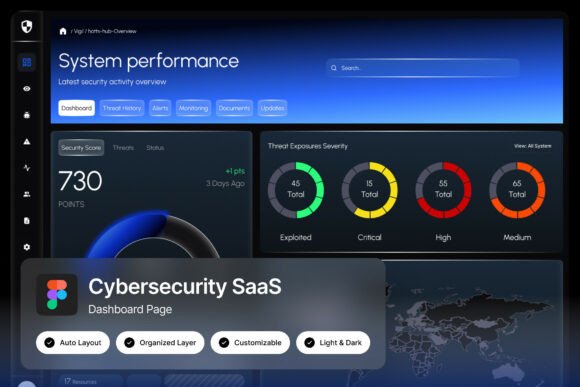
If you work in cybersecurity, you already know the feeling: too many alerts, not enough clarity, and always the pressure to act fast. The Vigil Cybersecurity SaaS Dashboard is built for that exact reality. It is a striking dark-themed interface with deep navy and neon blue tones, designed to communicate urgency and precision. But beyond the visual appeal, this dashboard delivers something more important: a structure that helps teams monitor threats, track system performance, and respond to incidents without drowning in noise.
Whether you are a product manager designing a security tool, a developer building threat detection software, or an IT administrator overseeing network infrastructure, Vigil offers a layout that matches how security work actually happens. Let us walk through where, when, and why this dashboard fits into real workflows.
What Vigil Cybersecurity SaaS Dashboard Actually Offers
At its core, Vigil is a high-resolution admin dashboard UI designed for cybersecurity platforms. It comes in a Figma file with a pixel-perfect, well-organized layout that includes system performance gauges, threat monitoring panels, network activity charts, and real-time security alerts. The design supports both light and dark modes, uses free Google Fonts, and is fully customizable. You get a clean ZIP file with the Figma file, a help guide PDF, and a font links text file.
What matters here is not just the features list but how these components work together in practice. The gauges give you at-a-glance system health. The threat panels surface what needs attention. The network charts show patterns over time. And the alerts demand immediate action. This is not a generic dashboard. It is purpose-built for high-stakes environments where every second counts.
Where Cybersecurity Teams Use Vigil in Daily Operations
Security operations centers (SOCs) are the most obvious setting. Analysts sitting in front of multiple monitors need a unified view of threats, system loads, and network traffic. Vigil provides that central pane. The dark theme reduces eye strain during long shifts, and the neon blue accents draw attention to critical metrics without being distracting. In a SOC environment, the dashboard becomes the single source of truth for ongoing incidents.
But you do not need a full-scale SOC to benefit. Small and medium businesses that handle sensitive data often use lightweight security teams or even a single IT person. For them, Vigil offers an interface that consolidates alerts from multiple tools into one readable screen. Instead of jumping between a firewall console, an antivirus panel, and a network monitor, they can see everything in one place.
Product teams building cybersecurity SaaS platforms also use Vigil as a reference or direct UI component. If you are developing a threat detection tool or a network monitoring service, starting with a well-designed dashboard saves weeks of design iteration. You can focus on backend logic and data integration while presenting information in a layout that users already find intuitive.
When Vigil Becomes Essential: Real Scenarios
Imagine a Monday morning. Your team receives an alert about unusual outbound traffic from a server. With Vigil, you open the dashboard and immediately see the network activity spike on the chart. The threat panel highlights the source IP and the destination. The system performance gauges show that CPU usage is normal, ruling out a resource-based anomaly. Within seconds, you have a clear picture: this is likely a data exfiltration attempt. You isolate the server and investigate further. The dashboard did not make the decision for you, but it gave you the information in a format that allowed quick action.
Another scenario: a SaaS startup is preparing for a security audit. The founder knows they need to demonstrate real-time monitoring capabilities. They set up Vigil as the front-end for their internal security stack. During the audit, they show the dashboard with live metrics, alert logs, and network graphs. The auditor sees that the team has visibility into system health and threats. That demonstration alone can satisfy compliance requirements around continuous monitoring.
Freelancers and consultants who offer cybersecurity services to multiple clients also benefit. You can customize Vigil for each client's environment, adjusting the panels and metrics to match their infrastructure. When you log in for a weekly check, the dashboard shows you exactly what changed since your last review. You do not waste time digging through logs. You look at the charts and alerts and move on to the next client.
How Different Professionals Use Vigil in Practice
IT infrastructure designers use Vigil to prototype monitoring setups before committing to a full build. They drop in sample data, test the gauge thresholds, and see how the alert system behaves. This allows them to validate their monitoring strategy early and avoid costly rework later.
Product managers in cybersecurity firms use the dashboard to communicate vision to developers and stakeholders. Instead of writing lengthy specs, they point to Vigil and say, "We want something like this, but with our data sources." The visual reference speeds up alignment and reduces misunderstandings.
UI/UX designers working on security tools appreciate the well-organized layers and named groups in the Figma file. They can quickly swap colors, adjust component sizes, or add new panels without rebuilding from scratch. The pixel-perfect layout ensures that what they design matches what developers implement.
Educators and trainers teaching cybersecurity concepts use Vigil as a teaching aid. They show students how a real dashboard presents threat data, how gauges reflect system health, and how alerts escalate. Instead of abstract diagrams, they have a concrete interface to discuss.
Small business owners who personally manage IT for their company use Vigil to gain visibility they never had before. Many run on shared hosting or basic setups and assume they are too small to be targeted. A dashboard like this changes that assumption. It makes threats visible, and visibility is the first step toward better security posture.
What to Consider Before Using Vigil Cybersecurity SaaS Dashboard
First, understand that Vigil is a UI design file, not a live monitoring tool. You need to connect it to your data sources. If you are a designer or developer, you already know this. But if you are a business owner expecting plug-and-play functionality, be aware that this is a front-end layout. The value comes from its structure and visual design, which you then populate with real metrics.
Second, consider your team's design capabilities. The Figma file is fully customizable, but you need someone comfortable with Figma to make changes. If you do not have that skill in-house, you might need to hire a freelancer for the initial setup. The help guide PDF and font links file make the process smoother, but some design experience helps.
Third, think about your monitoring goals. Vigil works best when you know what metrics matter to you. If you are not sure which system performance gauges to display or which alerts are most critical, take time to define those before customizing the dashboard. Otherwise, you end up with a beautiful interface that does not serve your actual needs.
Fourth, consider the resolution. Vigil is built at 1440x1024 px, which is ideal for desktop monitors. If your team uses smaller screens or mobile devices, you may need to adapt the layout. The design is modern and clean, but responsive adjustments require additional work.
Finally, note that the preview images in the download page are not included. You get the Figma file, the guide, and the font links. Plan to provide your own icons, logos, and sample data for presentations or demos.
Why Vigil Stands Out Among Cybersecurity Dashboards
Many dashboard templates exist, but few capture the urgency and precision that cybersecurity demands. Vigil does because it was designed with that context in mind. The deep navy background reduces visual noise. The neon blue highlights guide the eye to important changes. The gauge panels give immediate feedback without requiring interpretation. The alert section demands attention without overwhelming.
This is a dashboard that understands how security professionals think. They need patterns, not raw data. They need history, not just current state. They need alerts that are actionable, not just noisy. Vigil delivers on all three counts because its layout prioritizes what matters: quick comprehension and fast response.
Connecting Features to Real Outcomes
The system performance gauges are not just decorative. They help you catch a server that is running hot before it crashes. The threat monitoring panels reduce the time between detection and response. The network activity charts reveal trends that point to slow attacks or data leaks. The real-time alerts ensure that critical incidents do not fall through the cracks.
When you use Vigil, you are not just getting a pretty interface. You are getting a framework that mirrors how effective security monitoring works. That is why it is used by product teams, IT architects, and security analysts alike. It is not a tool that does the work for you. It is a tool that makes your work more effective.
If you are building or managing a cybersecurity platform, Vigil gives you a head start. You skip the design exploration phase and jump straight to implementation. You avoid common layout mistakes that confuse users or hide critical information. You present data in a way that builds trust with your team and your clients.
Final Thoughts on Vigil Cybersecurity SaaS Dashboard
In a field where clarity and speed directly impact security outcomes, Vigil provides a practical foundation. It is not about flashy visuals or overhyped features. It is about giving professionals a workspace that matches the gravity of their work. Whether you are monitoring threats for a multinational corporation or protecting data for a ten-person firm, the dashboard helps you see what matters and act on it.
Take the time to customize it for your specific environment. Connect it to your data sources. Train your team to read the gauges and alerts. When you do, Vigil becomes more than a design file. It becomes the control center that helps you stay ahead of threats, one alert at a time.