Evaluating the Care Sale YouTube Video Thumbnail Template for Your Visual Marketing Strategy
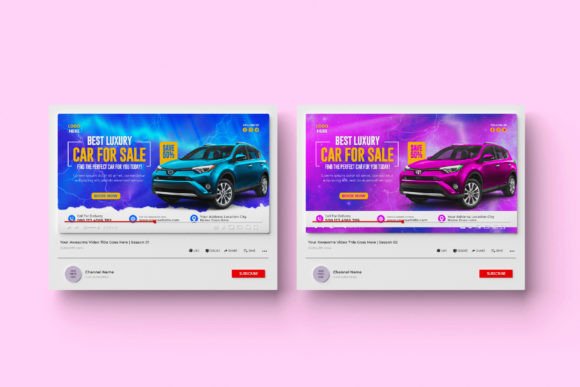
Creating consistent, impactful visuals is a cornerstone of effective digital marketing. Whether you are promoting a limited-time offer, launching a new product, or building brand recognition on social media, the quality of your graphics directly influences audience engagement. The challenge many professionals face is balancing speed, cost, and creative control. The Care Sale YouTube Video Thumbnail and Digital Marketing Facebook Cover template offers a structured approach to this challenge, providing a pre-built foundation that users can customize to fit their brand identity.
This article provides a balanced, practical examination of this specific template. We will explore what makes it distinct, compare it with alternative strategies, and discuss the scenarios where it serves as a strong solution versus situations where another approach might be more suitable.
Understanding the Core Offering and Its Specific Configuration
The Care Sale YouTube Video Thumbnail template is not a single static image but a layered Adobe Photoshop project. It is provided as two separate Photoshop files, specifically set to a 1080x1080 pixel dimension at 72 DPI in RGB color mode. This configuration is precisely tailored for digital screens and social media performance.
A key distinction of this product is the inclusion of a dedicated Help Guide. This guide is designed to assist users who possess basic familiarity with Adobe Photoshop but may not use the software every day. Alongside the guide, the template utilizes free fonts, with download links provided within the main file. This removes the common obstacle of missing or paid fonts, allowing the user to replicate the exact look of the preview image without additional cost. The file structure is built for easy customization, targeting professionals who need to modify text, swap images, and adjust colors quickly rather than designing from scratch.
Comparing the Template Approach with Other Visual Strategies
To fully appreciate the value of this resource, it helps to consider the broader landscape of graphic creation. Most individuals and businesses fall into one of several approaches:
Hiring a Professional Designer
Commissioning a graphic designer offers the most bespoke result. You receive a completely original asset tailored to your specific campaign and brand guidelines. This approach guarantees a unique look, but it demands a larger budget, longer turnaround times, and clear communication of your vision. For a single sale event or a recurring campaign, this can quickly become cost-prohibitive or time-inefficient.
Using Online Drag-and-Drop Platforms
Platforms like Canva provide an excellent starting point for non-designers. They offer speed, accessibility, and a massive library of assets. However, the level of granular control over layers, specific layer effects, and pixel-level alignment found in a structured Adobe Photoshop file can be limited. The Care Sale YouTube Video Thumbnail template offers a middle ground: the structured convenience of a pre-built layout combined with the deep editing capabilities of native Photoshop layers.
Creating from Scratch in Adobe Photoshop
Starting with a blank canvas offers absolute creative freedom, but it also requires a high level of skill and a significant investment of time. Every gradient, drop shadow, font placement, and background texture must be built manually. This path is best suited for highly specialized creative needs or for designers who enjoy the process of original composition. For a standard marketing promotion where speed and consistency matter more than complete originality, a well-designed template is often a more practical choice.
Evaluating the Practical Strengths of This Resource
When analyzing the Care Sale YouTube Video Thumbnail offering, several practical strengths stand out, particularly for the target audience of busy marketers and business owners.
- Time Efficiency: The conceptual design work is already complete. The task shifts from designing a layout to populating it with your specific content. This can reduce the production time for a professional-grade graphic from hours to minutes.
- Technical Optimization: The choice of 72 DPI and RGB color mode is not arbitrary. It is the industry standard for web and screen graphics. Using a 72 DPI file ensures the Photoshop project itself remains responsive and easy to work with, without unnecessarily large file sizes. The RGB color profile guarantees that the colors you choose will appear correctly on monitors, tablets, and smartphones.
- Onboarding Support: The inclusion of a Help Guide is a significant benefit for someone who fits the "knows the basics" description. It acts as a roadmap to the file's structure, showing exactly how to edit Smart Objects, replace images, and manage text layers without breaking the design. The provision of free font links eliminates a common source of frustration.
- Consistent Branding: Using a template allows you to create a cohesive look across multiple touchpoints. A YouTuber or business owner can use the same base design to create a video thumbnail, a Facebook post graphic, and a story highlight cover, maintaining visual consistency that builds recognition.
Recognizing the Tradeoffs and Limitations
An informed decision requires a clear understanding of a product’s limitations. While the Care Sale YouTube Video Thumbnail template is a strong tool in the right context, it is not a universal solution for every visual need.
- Software Dependency: This template is built exclusively for Adobe Photoshop. If you do not have access to this software or are committed to a browser-based workflow, you will not be able to directly edit the layered files. This is the most significant practical barrier to entry.
- Skill Floor: While basic knowledge is sufficient, the user must be comfortable with concepts like layer panels, text tools, and color pickers. Editing a drop shadow or a gradient overlay requires a slightly higher comfort level, though the Help Guide aims to bridge this gap.
- Aspect Ratio Adaptation: The 1080x1080 square format is highly versatile for platforms like Instagram and Facebook. However, the standard YouTube video thumbnail is a 16:9 horizontal rectangle (1280x720 pixels). A marketing professional wanting to use this template directly as a YouTube thumbnail will need to adapt the composition. Placing the square into a 16:9 canvas or cropping it requires careful consideration to ensure the main text and call-to-action remain fully visible and on-center. Similarly, a Facebook Page Cover has a different landscape dimension than a square feed post.
- Contextual Focus: This specific template is designed around a "sale" or promotional theme. While this is excellent for offer-based content, it is less suited for educational, lifestyle, or organic storytelling content that might require a wholly different visual vocabulary.
Identifying the Ideal Fit and When to Consider Alternatives
The Care Sale YouTube Video Thumbnail resource is best suited for a specific profile of user and a specific set of tasks.
The Right Fit:
- The Solo Entrepreneur: Running their own social media and email marketing, they need professional assets for weekly promotions or sales events without a full-time design budget.
- The Social Media Manager: Handling multiple clients, they need reliable, fast templates that can be adapted to different brand colors and fonts while maintaining a high professional standard.
- The Content Creator: Who posts regular sales, launches, or "limited offer" content on YouTube and cross-promotes on Facebook and Instagram. They value a template they can rely on for consistency every time they run a promotion.
- Avoiding Blank Page Anxiety: For anyone who finds starting a design from scratch intimidating, this template provides a professional starting point that requires only basic editing skills to execute.
When a Different Solution Might Be More Appropriate:
- Strictly 16:9 Video Thumbnails: If your primary content strategy relies solely on YouTube thumbnails and you do not want to spend time adapting a square file, a template built specifically in a 16:9 ratio would be a more direct fit.
- Unique, Original Art: If your brand identity demands highly original, illustrative, or unconventional graphic compositions, a template might feel too structured. A custom design project would offer the necessary creative freedom.
- Non-Photoshop Ecosystem: If your team relies entirely on Canva, Figma, or other browser-based tools, this Adobe-specific file will not fit your workflow.
- High-Resolution Print Needs: Because the file is set to 72 DPI and RGB, it is optimized for screens and is not suitable for large-format printing, which generally requires 300 DPI and a CMYK color profile.
Practical Guidance for Getting the Most Out of the Template
To maximize the value of this resource, approach the customization process methodically. Start by opening the included Help Guide. Identify the Smart Object layers for images—these are typically how the stock image is replaced. Ensure you download the linked free fonts before you begin editing, as substituting fonts can shift your text layout.
Because the file is 1080x1080, think of it as a base asset. For a YouTube thumbnail, create a new 1280x720 document in Photoshop. Place your square design in the center, then decide if you want to crop the top and bottom for a tight fit or add a blurred background extension to fill the sides. The key is to keep your main call-to-action within the center safe zone of the 16:9 canvas. For Facebook, this square dimension works directly as a feed post or an ad creative, which is where it performs best.
The 72 DPI and RGB settings mean you are ready to export immediately. Use the "Save for Web" function in Photoshop (Legacy option) to generate high-quality JPEG or PNG files at a manageable file size, which helps with page load times on your website or social platforms.
Ultimately, the Care Sale YouTube Video Thumbnail template is a practical, time-saving asset that sits comfortably in the middle of the design spectrum. It offers the professional depth of a native Photoshop file without requiring the advanced skills of a specialist designer. By clearly understanding where it fits into your workflow, you can decide if it is the right tool for your next campaign.